
If you have the Township, Lot and Concession numbers for a property and want to find its address, location, shape and size, the Ontario Ministry of Agriculture, Food and Agribusiness has a free online website AgMaps that provides agricultural information and tools as well as the ability to which makes it easy to find the lot, concession and township for any place just by zooming in on a map.
- Go to How to use AgMaps
- Read the information, and click the Launch AgMaps button.
- Wait for the licensing logo to turn to the disclaimer page.
- Scroll down and click the I accept button.
- Select the Layers tab.
- Select Search By Location tool.
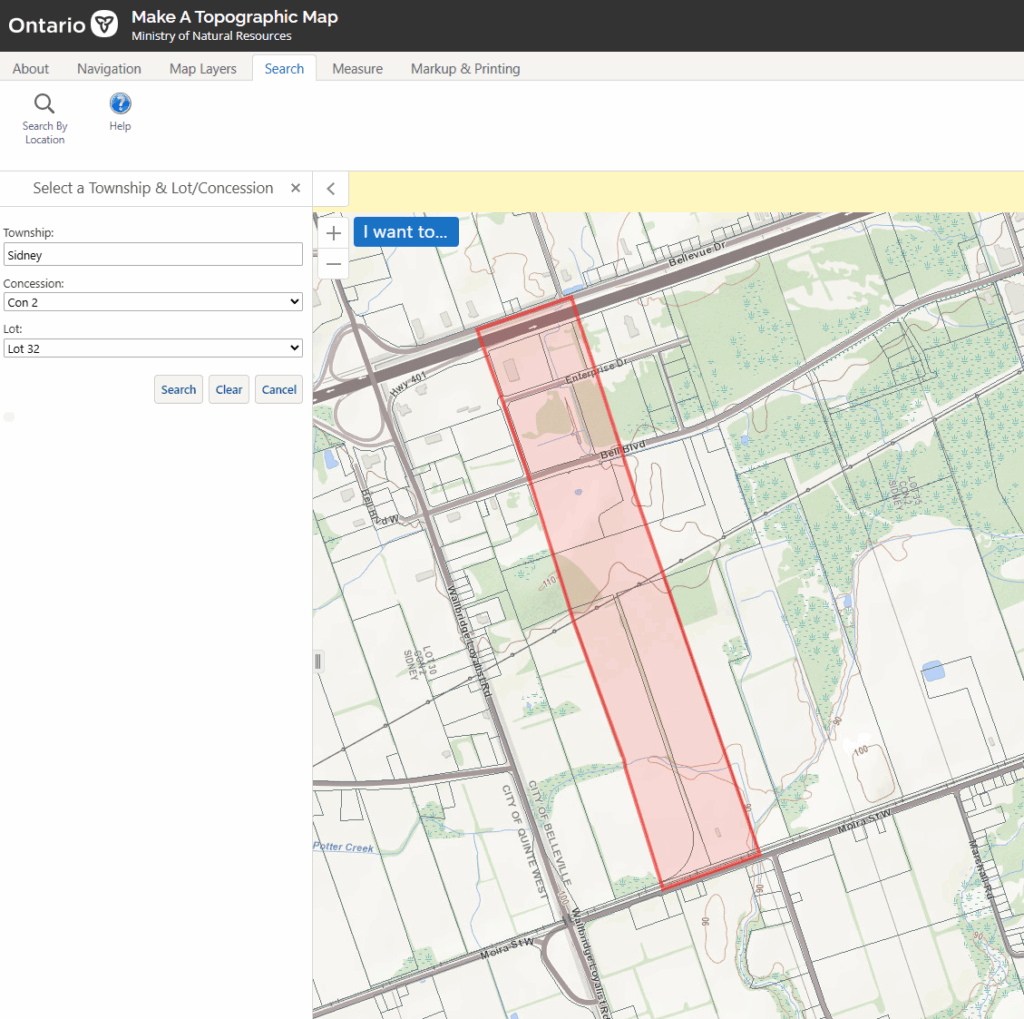
- Select the Select a Township & Lot/Concession option in the left sidebar.
- Enter the Township, Lot and Concession and click the Search button
- The map will display a highlighted property.
- Right click inside the highlighted area to get the address and latitude and longitude.
Example
For example, an application for consent to the separation and conveyance of part of the property in the Committee of Adjustment meeting minutes describes the property as:
Application B 22/16 Part of Lots 32-36, Con 2 Sidney, Now Belleville
Belleville Committee of Adjustment September 15, 2016
Owner: Robert Jakes, Jenland Properties Ltd.
Agent: Keith Watson, Watson Land Surveyors Ltd.
Searching for those details:
- Township: Sidney
- Concession: 2
- Lots: 32 to 36
Returns the following property:


Comments
We want to hear from you! Share your opinions below and remember to keep it respectful. Please read our Community Guidelines before participating.