
Ontario’s court system is based on the fundamental principles of openness and accessibility – the ‘open court principle’ which gives the public the right to access court documents, including Statements of Claim. Most court documents are publicly accessible upon request, unless a statutory provision, common law rule or court order restricts access.
In Ontario, the filed with the Superior Court of Justice, in accordance with the open court principle. However, these documents are not readily available online. To view or obtain a copy of a Statement of Claim, you can follow these steps:
Public hearings
Subject to subsection (2) and rules of court, all court hearings shall be open to the public.
Section 135 of the Courts of Justice Act
Documents public
On payment of the prescribed fee, a person is entitled to see any document filed in a civil proceeding in a court, unless an Act or an order of the court provides otherwise.
Section 137 of the Courts of Justice Act
Many court records in the Ontario Court of Justice and Superior Court of Justice are accessible at no charge and are accessible to the public at no charge over email or telephone.
In general, court staff must facilitate access to court files and documents as quickly and efficiently as possible.
What is a Statement of Claim?
In Ontario, a Statement of Claim serves as the starting point for a civil lawsuit against a defendant(s) where the monetary value of the claim exceeds $35,000. It must:
- Provide a clear outline of the claims for remedies and damages being sought
- Be filed and served within two years of the date the plaintiff knew or should have known they had a legal claim against the defendant(s)
In Ontario, defendants have 20 days to serve and file a statement of defence or 10 additional days if a notice of intent to defend is served.
Here’s how to request a copy of a Statement of Claim for a civil case:
Find the Case Number and Court Location
- Log in to your My Ontario Account or create an account if you don’t have one.
- Scroll down and click the Start button next to Court Case Search:

- Check the box to agree to the Terms of Use and click the Start button.
- Select the Case Type and enter the Surname and/or Given name of the defendant or the Business name of one of the Plaintiffs or Defendants

This search tool will only provide information about active criminal cases with:
- Future court date,
- Court date within the past 7 days, or
- Bench warrant issued within the past 5 years
It will return the following for each result:
- Case Number
- Court Location
- Case Title
- Publication Ban
- Name of the legal representative of the person or company
The Case Number format is as follows:
- Case Number: CV24000339950000
- CV – Case number prefix
- 24 – Last two digits of the year the case took place (e.g., 2025 is entered as “25”)
- 00033995 – Case number
- 0000 – Case extension
If there is an N under Publication Ban, the documents are likely available to the public.
Clicking the + symbols under Parties displays the following:
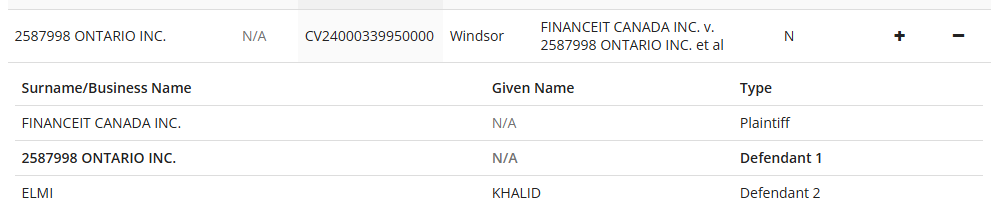
Clicking the + symbols under Details displays the following:

- Amount of claim
- Most Recent Order Date
- Next Event Date
- Case Opened Date
Find the courthouse’s contact information
Ontario’s court system is made of up two courts:
- Ontario Court of Justice, composed of provincially appointed judges and justices of the peace who hear adult criminal, youth criminal, family law, child welfare, and provincial offences.
- Ontario Superior Court of Justice, which only tries the most serious criminal offences as well as civil (commercial matters, personal injury, bankruptcy, estates), family cases (divorce) and Small Claims Court.
Here’s how to find a court’s contact information:
- Note the Court Location returned by the Court Case Search in the previous section. This is the courthouse where the Statement of Claim was filed.
- Look up the Superior Court of Justice location or look through Ontario Courts of Justice Email Addresses and find that court’s phone number and email address.
- Contact the court by phone or email to request the record(s) relating to the case. Provide the Case Number, Case Title, and specify the documents you are requesting.
- Ask about the process for obtaining copies remotely, including any associated fees and payment methods.
Email the court registrar and request the Statement of Claim
I first emailed [email protected], they forwarded my inquiry to [email protected] who then sent me the Statement of Claim, free of charge.
Subject: CV24000339950000 – Statement of Claim
Good afternoon,
I’d like to request a copy of the Statement of Claim for CV24000339950000 – FINANCEIT CANADA INC. v. 2587998 ONTARIO INC. et al.
Please let me know how to proceed.
Thanks,
Alex
And voila, the Statement of Claim:
If you are unable to find an email address or don’t hear back, call the court and ask how to obtain a copy.
Other records
There may be a fee for inspecting a court file.
- Copies and photographs of documents, subject to a copy fee per page.
- Digital Audio Recordings of “on the record” court proceedings at the Ontario Court of Justice.
- Access exhibits in criminal cases and exhibits entered into evidence during civil and family trials.
- Attend court proceedings (some limits may apply)
Today’s and tomorrows court dates
- Ontario Court Dates has daily court lists of upcoming criminal, civil and family cases before the Superior Court of Justice and the Ontario Court of Justice today and tomorrow, including:
- Party Name
- Case Number
- Title of Proceedings
- Time
- Room
- Appearance Type
- Method of Attendance
Court decisions can be found on Canadian Legal Information Institute (CanLII)
You can search by text, case name, document title, file number or other details:
Exceptions and restrictions
The Freedom of Information and Protection of Privacy Act (FIPPA) does not apply to court case records. Access to them is governed by the courts.
- Youth criminal cases are strictly confidential as per the Youth Criminal Justice Act.
- Sexual assault cases may have restricted access under publication bans.
- Sealed records require a court order to access.
- Records subject to ongoing investigations may be restricted.



Comments
We want to hear from you! Share your opinions below and remember to keep it respectful. Please read our Community Guidelines before participating.